Muse Spark 1.1 Enters the Game Creation Arena

I’ve recently received a request to put Meta’s new Muse Spark 1.1 model through the agentic game creation test, to see how it would perform. If I am remembering right, Muse Spark 1.1 was released recently, in early July.

Meta’s blog post states “Muse Spark 1.1 is a multimodal reasoning model built for agentic tasks, with major gains in tool and computer use, coding, and multimodal understanding.”

Among other things (coding for one), Muse Spark 1.1 was trained specifically for orchestration and delegation to sub-agents. The blog states: “[Muse Spark 1.1] tackles complex projects significantly faster than Muse Spark, as it is trained to orchestrate multi-agent systems to optimize end-to-end latency. As the main agent, it can gather context, make a plan, and delegate execution across parallel subagents. As a subagent, it adheres to its job, understands available tools, and knows when to escalate back to the main agent.”

The blog post also states that “[Muse Spark 1.1] zero-shot generalizes to new native tools, MCP servers, and custom skills.”

Did someone say zero-shot? Have I got a prompt for you, Muse Spark 1.1…

A reminder, my one-shot autonomous agent game generation prompt is an offshoot of my older, explicit orchestrator/sub-agent framework, and a model that can do the orchestration itself and delegate to sub-agents should do well at the task.

So, I tried it out…and it did quite well! Using Muse Spark 1.1 served from Open Router, and in the Visual Studio Code GitHub Copilot plugin, it designed, coded, and tested a nice and competent game. Its token cost was among the more reasonable, only about $25, significantly less than Opus and Fable, and more on par with Grok 4.5.

An interesting side note: it spent a significant amount of time and tokens on what seemed to be the initial implementation and feature design; however, once the design was set, it seemed to speed-run the implementation of the 25 new features. My guess is that the features were all being orchestrated and implemented in parallel (when possible) by subagents the LLM spooled up; however, this is just a guess.

Another side note: this was probably the most context heavy run of all the models. Most of the models finished the task with a context in the mid to high 200K token range; Muse Spark 1.1 finished with a context of 437K tokens, significantly more than most of the other models. I’d be interested in looking into why this might be.

All in all, for this autonomous workload, I would put Muse Spark 1.1 in the same (subjective) neighborhood as Grok 4.5, GPT-5.5 and GPT-5.6 Sol, Sonnet 5, and Kimi K3.

Muse Spark 1.1 Game Card

You can play the Muse Spark 1.1 generated game here, in your web browser; just look for the Muse Spark 1.1 game card: https://rgm-llm-asteroids-arcade.netlify.app

As always, the controls are <c> to insert your coin, <1> to start a 1 player game, arrow keys for turning and thrusting, <space> to fire, and <h> for hyperspace.

Meta AI’s blog post announcing Muse Spark 1.1 : https://ai.meta.com/blog/introducing-muse-spark-meta-model-api/

Fugu Ultra Treated Game Creation Like a Team Sport

Last month, Sakana AI released their Fugu LLM, to headlines such as ‘Sakana AI launches Fugu Ultra and its orchestration model matches Fable and Mythos without training a single frontier model’ and ‘Sakana Fugu Ultra promises to deliver “the very best frontier-level performance” by… using frontier AI models.’ YouTube was full of videos asking ‘Is Fugu better than Fable?’

Example of headlines on YouTube when Fugu was released.

Early coverage framed it as “one model to command them all,” a way to match Anthropic’s Fable/Mythos-level results through collective intelligence rather than a single giant model, while also reducing dependence on any one provider or export-control risk. In short: multi-agent coordination packaged as a single model interface.

What may have gotten lost in the hype is what Fugu actually IS. Fugu is a family of “learned orchestrator models”. It is trained as a language model whose job is to read a query and dynamically construct an agentic scaffold (selecting workers, assigning roles, verifying outputs, synthesizing the answer) over a pool of frontier models. The user interacts with it as if it were a single model, but the heavy lifting is done by the orchestrated team.

You talk to it like any other model (OpenAI-compatible API), but under the hood it reads the query and dynamically builds the scaffold and pool of workers, deciding which models to call, what roles to give them, how to verify intermediate results, and when to synthesize the final answer.
There are two variants:

  • Fugu – prioritizes everyday usability and lower latency; it often routes to a single strong worker.
  • Fugu-Ultra – prioritizes maximum quality on hard, multi-step problems and can spin up richer multi-agent workflows with isolation and shared memory.

Of course, I had to add it to my autonomous agent game creation test.

I tried out “Ultra” because I didn’t know what to expect, and I wanted to give Fugu the greatest chance of creating a playable game.

Some results:

  1. Fugu Ultra ran for a LONG time, compared to even the most powerful “uni-models”. I didn’t expect this, and so I didn’t think to time the run, but it was probably an hour or more. This in comparison to strict Fable or Opus runs (~45-50 minutes) and Grok 4.5 (~20 minutes). Note that Fugu Ultra is designed to spin up multi-agent workflows to solve the problem, and can easily spin up multiple ‘heavy lift’ models that may take a long time to synchronize and complete the task.
  2. Fugu Ultra is EXPENSIVE, somewhere in the $70-$80 range to design and implement the prompted game in my test, similar to strict Fable or Opus. Again, it was likely spinning up expensive models to do a lot of the work. For some reason I had not expected this (duh!), and ended up feeding OpenRouter multiple $20 token buys to get the job done.
  3. Fugu Ultra is INTERESTING in what aesthetics and features it designed. The look and the play of the game it produced has a distinct style, so much so that the style can distract from gameplay; however, I like it in that its style is unique vs. the other LLMs that I’ve tested. For example, it chose to use what looks like swirling
    confetti for its explosions instead of a more vector graphics look!

What’s really interesting to me is, I don’t know what LLM Fugu outsourced the aesthetics and game design decisions to, and it’s a really unique style. I’m not sure that a second run would recreate that same style. (I’d try a second run as an experiment if the token cost wasn’t so high)

The runable (browser based) version of the Fugu Ultra game (as well as the games from the open model LLMs) can be found here (arrow keys to turn and thrust, space to fire, h for hyperspace):

https://rgm-llm-asteroids-openweight-arcade.netlify.app

Honestly, although there are some somewhat annoying things about the game implementation, I really do love the confetti explosions.

Sakana Fugu’s technical report : https://arxiv.org/html/2606.21228v2

Let’s try the latest open weights models

A friend of mine recently asked me to test my current autonomous LLM game generation pipeline with a few of the latest open weight models. I used Visual Studio Code GitHub Copilot and it’s “Bring Your Own Key” capability to hook it up to the various models on my Open Router account.

I was a bit underwhelmed by the models I tested (DeepSeek 4 Pro, GLM 5.2, and Kimi K 2.7-code), at least for my game generation prompt. It should be noted that, just because one run on my workload resulted in underwhelming results, that doesn’t mean that these models wouldn’t do well on someone else’s coding workload, or even on another run.

Interestingly, just as I was wrapping up my testing, Moonshot AI released Kimi K-3. The drop of K-3 instantly generated a lot of hype, and it was being compared to Opus and Fable on various social media (especially YouTube). I wanted to test it out on my own workload.

Easier said than done, as when I submitted my prompt to Kimi K3 through OpenRouter, the prompt would “bounce”, with a message that seemed to be indicating that K3 was being throttled due to excessive demand, and indicating that I should “try again”. After trying at various hours throughout the day and evening, I resigned myself to waiting until the initial demand had dissipated before trying agin.

Rate limit message from Kimi-K3

Luckily the next day I was able to run the prompt, and lo and behold Kimi K3 generated a nice, playable game autonomously. The game it generated is comparable to ones generated by Fable, Opus 4.8, Sonnet 5, Grok 4.5, and GPT-5.6 Terra and Sol. It didn’t seem to be particular speedy, but cost-wise it produced the finished game for ~$13, as opposed to ~$50-$80 for the Anthropic models.

From my tests, I would rank Kimi K-3 below Fable, Opus 4.8, and Grok 4.5, but above Sonnet 5 and GPT-5.6 Sol and Terra, which is quite amazing. In fact, the rise in ability of Grok 4.5 and Kimi K-3 in these types of tests is truly amazing. A reminder, the prompt has the agent implement AND design the features, so I am not only testing coding, but the “aesthetic” ability of the models.

Run-able versions of the open weight models’ generated games on a new website.

The run-able versions of the games generated by the open weight models can be found here:

https://rgm-llm-asteroids-openweight-arcade.netlify.app

You can compare the results of the open weight models to the games previously generated by the frontier LLMs:

https://rgm-llm-asteroids-arcade.netlify.app

I still like the design chops of Fable, but I can’t justify its cost for a project like this. I’ve run some tests with using Fable for explicit game design and project scaffolding, and then switching to Grok 4.5, GPT-5.6, or Sonnet 5 for the code implementation and testing phases, all in the same context. The initial results are encouraging, and I’ll post another blog post soon with the details.

Testing Claude Sonnet 5 as an autonomous game development agent

I was able to test Anthropic’s newest welterweight class model, Sonnet 5, on the one-shot “make me a game” agentic prompt I had developed in my last post. I’ll go into more detail about the prompt after the Independence Day holiday,.

Briefly, the prompt instructs a single agent in a single context to create a basic Asteroids game, then come up with 20 fun new features all on its own, and iterate on them one by one, using Playwright autonomously to take screen captures of the game to validate the graphics.

The full prompt is here, and includes guidance to the LLM on code architecture, testing, and choosing new features : https://github.com/rgmarquez/devrep20-claude-sonnet-5/blob/main/notes/prompt.md

I’ll analyze the pros and cons of the one-shot prompt versus the much more structured feature orchestrator agentic pipeline I had been using before the (on again, off again) release of Claude Fable. I’ll also discuss some interesting observations and challenges I noted while watching Sonnet 5 iterate on the features, including intuitions on what fully agentic LLM pipelines may struggle with in the future, and the high token and money costs of fully agentic flows such as this one.

But for now, I present you Claude Sonnet 5’s solution.

The attract screen
Basic Gameplay
Bonus modes designed by the LLM.
More bonus modes designed by the LLM.

The game can be played in a web browser here : https://rgmarquez.github.io/devrep20-claude-sonnet-5/

The actual GitHub repository can be found here : https://github.com/rgmarquez/devrep20-claude-sonnet-5

Chronicling the Singularity

It’s been almost 2 years since I last posted to this blog. Since then, related to the world of software development, two things have changed:

  1. I’ve been working at a large game company as a Senior Software Engineer on one of the technology teams; it’s nothing short of a total blast working with the people on my team.
  2. The dawn of agentic coding has arrived on the software scene, and knowledge work in general.

It’s terrifying and exciting times to be a software developer. I hope to document each step along the way.

(Skip to the bottom if you just want the ‘fun stuff’ 😀)

I started using coding assistants only recently. In November 2025, a coworker demonstrated GitHub Copilot in Visual Studio Code to team members. He was amazed at how quickly he could get working prototypes up and running. At first, I found it interesting, but as his demonstration continued, I too was amazed.

Over November and December, the team independently started experimenting with coding assistants to see what they could do, what mistakes they would make, and what best practices we could devise for using them in production code.

In December, we shipped our first AI-assisted project, weeks ahead of schedule and with better documentation than in many prior projects.

By January and February 2026, we were routinely using AI to explore and document older codebases, as well as to assist with maintenance and modernization efforts. We even began investigating ways to use AI for reducing accumulated technical debt…ironically, since one common complaint about AI agents is that they add to a codebase’s technical debt.

As of March 1, 2026, all team members use coding AI as an efficiency tool at work on a daily basis. All of us are also pursuing side projects after hours, experimenting with AI coding agents to push their limits, identify where they fail, and determine where they add value. Several of us have created functional web apps that solve problems we had long intended to address through traditional development but never found the time for. And all of us are working on passion projects—mostly game-related—that would traditionally require several programmers and artists weeks to prototype, but which can now be prototyped in several nights by one software engineer.

In the coming weeks, I will present some of these passion projects. I will also provide posts on the best ways to fully and deeply understand—or “grok”—Large Language Models and agentic AI, so that you do not have to treat them as black boxes and can more fully grasp their problems and usefulness in software development.

Additionally, I will blog about the societal implications of the rapid rise of AI in general, with thoughts on how to not only survive but thrive, and what to teach your children to do the same.

For now, I will present a one-off project that I created on a whim last night. A coworker was investigating realistic gem rendering on screen. He considered existing game engines, including Godot and Unity, to give him a head start. He used AI to assist, but he was not getting the results he wanted in Godot, so he switched to Unity. He reported decent results—this was Friday, two days ago—but I suggested he look into web-based technologies, as they would provide cross-platform availability out of the box.

That night, I wondered how easy it would be to create a web-based gem renderer. While half-watching TV with my wife and daughter, I decided to have Claude Opus and Claude Sonnet help me develop one. I wrote a detailed software specification, omitting the rendering technologies so that the AI could recommend them. I then had Claude Opus create the plan and Claude Sonnet execute it.

The result is a web app, using three.js, that renders gemstones in real time:

Example (screenshot from live gem animation)

The live website has the gem autorotating in real time, and you can use the mouse and mouse button to see different orientations of the gem. You can also switch gems (Diamond, Sapphire, Emerald, Citrine) and change some of the render parameters using on screen sliders.

It’s important to note; without human intervention, the concept of “aesthetics” often eludes the current LLMs, especially in a coding context. They are getting better at it, but often developers will have to coach the LLM, “move it more to the left so that it is inline with the text above”, or “the spaceship looks like a rectangle, it was supposed to be a chevron”, or even “that gem looks like *ss, lets brainstorm ways to fix it.”

This is where I believe that humans will always be needed. We may get to a point where AI can render a movie for a consumer ‘on the fly’, but will it be good? Coherent? Watchable for more than 5 minutes?

This came into focus when I tried to work with an LLM to convert the web based gem renderer to Vulkan, to run natively on MacOS and Windows. The first attempt looked like *ss. And, after several hours of re-prompting and coaching, it still looked like *ss. However, I have a plan on how to get the LLM agent to convert the renderer to Vulkan in a way that exactly replicates the WebGL renderer. Stay tuned.

If you are interested in trying out and seeing the web version of the gem renderer, try out the live website here : https://rgmarquez.github.io/gem-render/

The GitHub repo is here : https://github.com/rgmarquez/gem-render

Which one, which one…

There are so many development topics I want to cover, it’s hard to know where to start. I want to talk about projects I’ve worked on in the past (there have been a LOT of them), but I also want to talk about new projects that I am curently starting.

I’m currently unemployed right now (and looking for work!), but in my now expanded spare time, I’m trying to learn some new technologies, while bolstering my knowledge of some things I’ve done in the past.

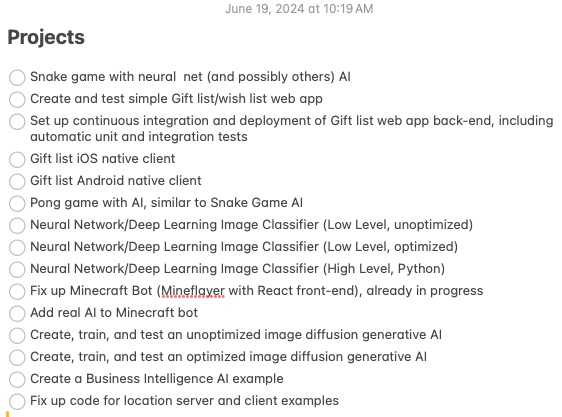
So perhaps I’ll start off with my list of current projects that I’m starting, in no particular order:

All of these projects will be hosted on GitHub (actually, some already are), and as I work through development, I’ll be making sure to update the source code and supporting files there.

Here : https://github.com/rgmarquez?tab=repositories

Incidentally, I do tend to keep a lot of notes and lists, from lists of projects I’m working on, to lists of features (specs?), to lists of bugs that I’d like to fix, to cool features that I’d like to add. When I’m working professionally, Iuse Atlasian’s Jira (https://www.atlassian.com/software/jira) to keep track of projects, features, and bugs. However, for my simple experimental projects, I tend to use simpler tools like Apple’s “Notes” app when I’m working strictly on my Mac Laptop, or Evernote when I will be switching between my Mac laptop and my Windows laptop.

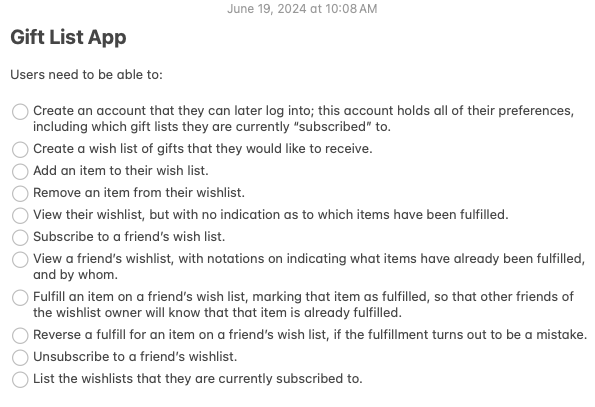
For example, the “spec” for my gift/wishlist app looks like this:

It should be noted that I like to develop my own apps in stages, starting with a “minimal viable product”, or even a “prototype”; I don’t want to start with every feature that can be imagined, I want to start with something that will be useful, while uncovering issues that I may not have thought about when starting a project (the “unknown unknowns”). Additionally, I like to start small to make sure that the product is something useful, to make sure that I am “building the right product” as well as “building the product right”.

For now, one of the main goals for these projects is learning new things, and reinforcing old skills, so for many of them, “usefulness” (other than as an example for others) may not be a major concern. 😉